


If you’re here, that probably means that you’re new to our platform. In that case, welcome! This article will help integrate you into the ins and outs of iSharing. This article will be split into three sections: signing up, adding a friend, and viewing a friend’s location.
1. Signup
Our signup process is made to be as simple as can be. You will be prompted upon opening the app for the first time to create an account. During this time, you will also be invited to sign up for our Premium Service. More details can be found: https://help.isharingsoft.com/hc/en-us/articles/115000601488-What-is-Premium-Service-
2. Add Friends
To add a friend:
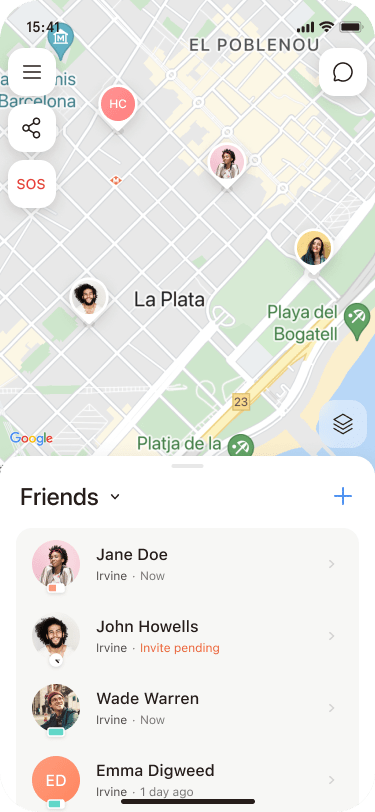
- Locate the icon that displays a person with a “+” sign at the bottom left corner of iSharing’s main screen.
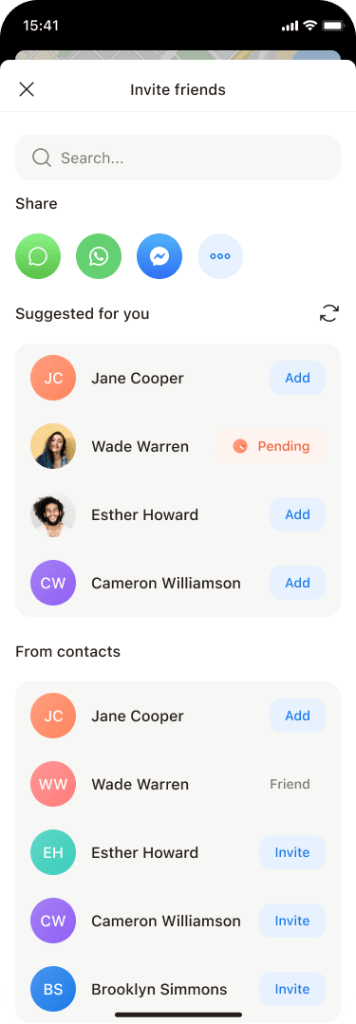
- Clicking on it will allow you to freely add friends via several methods (Phone Contacts, WhatsApp, KakaoTalk, Messenger, etc.). What invite options appear available to you will depend on the social media apps that you have downloaded on the same device.


3. View Location
To view a friend’s location, first enter iSharing’s main screen:
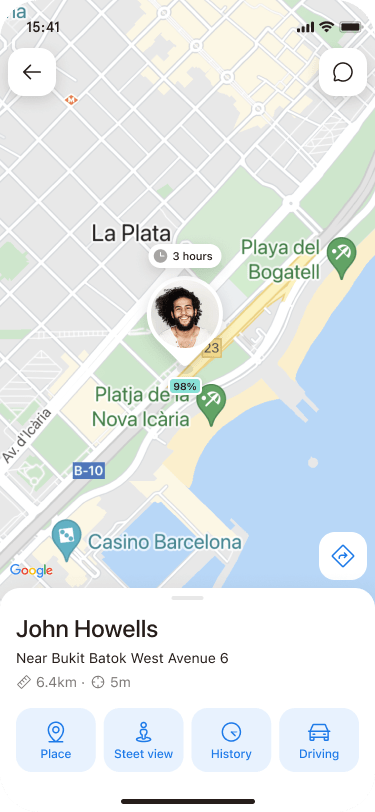
- Click on a friend’s picture at the bottom OR select their icon via the map
- Their location should then be displayed along with the address in which they are at.
Not using iSharing yet? Give it a try and download today!
Download on Google Play Store (Android)
Download on Apple App Store (Apple)