


Are you tired of following your kids around all night just to make sure they’re safe?
Halloween is supposed to be fun, not exhausting. Between crowded neighborhoods, dim streets, and sugar-fueled excitement, it’s easy for parents to feel anxious or overwhelmed. That’s where iSharing’s GPS location tracker steps in – helping you keep your kids safe without chasing them from door to door.
What if you could give your kids that amazing Halloween freedom AND feel completely at peace about their safety?
1. Why Halloween Safety Matters: Common Dangers Parents Should Know
Halloween can be a bit chaotic, especially for parents trying to keep track of their kids as they move from house to house in search of treats. Darkness, crowded neighborhoods, and the excitement of the evening can make it difficult to ensure your child’s safety.
Statistics show that Halloween night poses higher risks for children, including pedestrian-related accidents and instances of children getting lost. With these potential hazards, a family safety app like iSharing can help you stay connected with your kids and keep them within your virtual reach, even when they’re out of sight.
2. The Halloween Parent Problem
Every year, parents find themselves torn between keeping kids safe and letting them enjoy a bit of independence. You want to give them freedom—but not at the cost of peace of mind. Instead of spending your evening running down streets or calling every few minutes, iSharing lets you check your child’s location instantly and rest easy knowing they’re okay.
3. How iSharing’s GPS Tracker Keeps Kids Safe During Trick-or-Treating
iSharing’s Halloween GPS tracker uses real-time location tracking technology to help parents monitor their kids’ safety during trick-or-treating. With tools like Geo-Fencing and Panic Alerts, this Halloween safety technology ensures your family stays connected – even when the night gets busy.
Using the app’s features, you can:
- Track real-time location: You’ll always know where your child is, and they’ll know you can check their whereabouts if necessary.
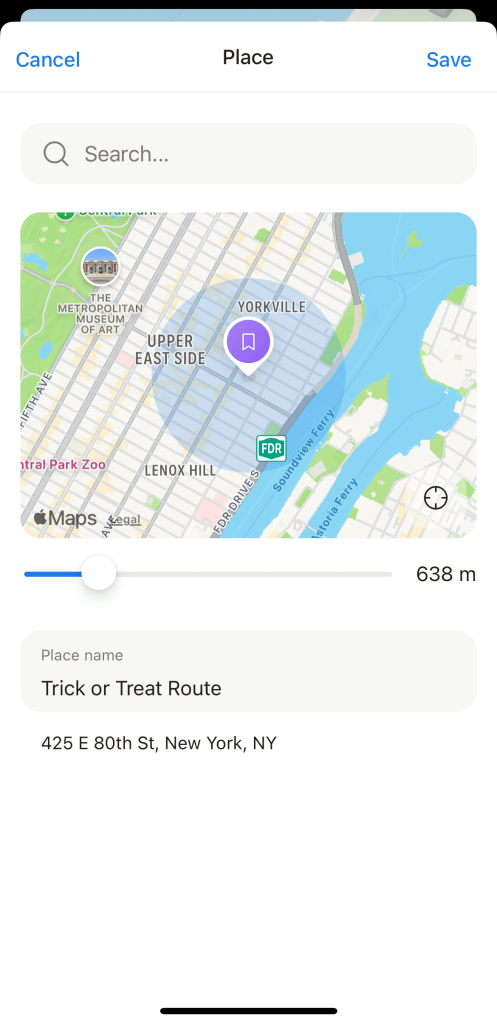
- Set up Geo-fences: With iSharing, you can set up “safe zones” by marking specific areas where your child is allowed to roam, such as around your neighborhood or along their trick-or-treat route. If they stray outside of these zones, you’ll receive an instant alert.
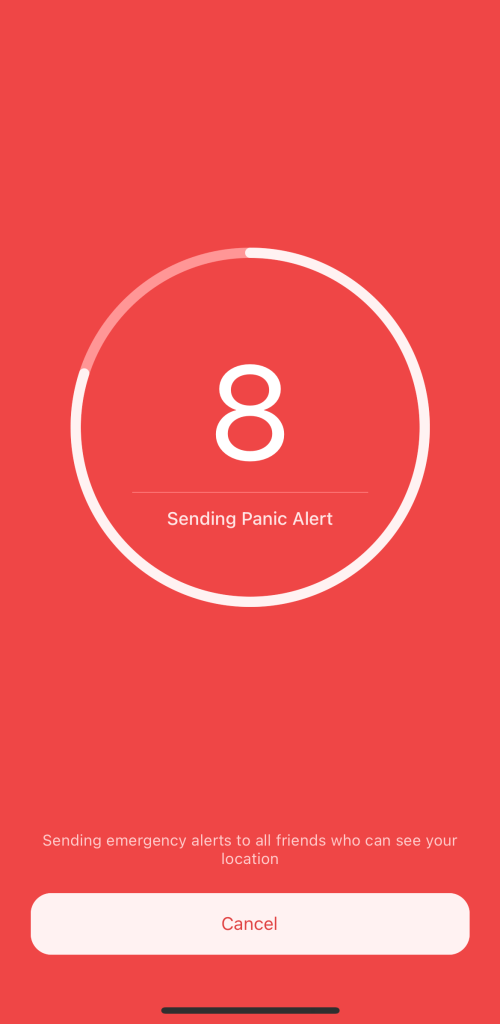
- Panic alert feature: In case of an emergency, your child can quickly send you an alert with their exact location, allowing you to respond right away.
These features not only provide peace of mind for parents but also empower kids by giving them a sense of security, knowing that help is just a tap away.

4. How to Set Up the iSharing App for a Safe and Stress-Free Halloween Night
Before heading out for Halloween festivities, make sure you and your children are well-prepared by setting up iSharing together. Here are a few easy steps:
- Download the app: First, ensure that you and your kids have the iSharing app installed on your smartphones.
- Create family circles: You can create a family circle within the app where everyone’s location is shared. This way, if your kids are trick-or-treating with friends or siblings, you can monitor the entire circle.
- Set boundaries and safe zones: Discuss the trick-or-treat route with your kids and set boundaries using the Geo-fence feature. Make it clear where they’re allowed to go and what areas to avoid.
- Explain the panic button: Walk your child through the panic alert feature so they understand how to use it. Ensure they know it’s for emergencies only, but it’s there for them if they ever feel unsafe.
5. Encouraging Independence While Staying Safe
Halloween is a great opportunity for kids to exercise a bit of independence, but it’s important that this freedom comes with safety precautions. iSharing strikes a perfect balance by allowing kids to explore and have fun while still giving parents the security of knowing where their children are at all times.
You can let your older kids trick-or-treat with friends, knowing that if they ever get lost or separated, you’ll be able to locate them quickly using the app’s GPS tracking. Plus, with the Geo-fence feature, they can enjoy some freedom, while you can ensure they’re staying within the safe boundaries you’ve set.
6. Tips for a Safe and Fun Halloween Night
In addition to using iSharing, there are other practical steps you can take to make sure your kids have a safe Halloween:
- Bright costumes and flashlights: Equip your kids with bright or reflective costumes to help them be seen in the dark. Providing a flashlight or glow stick will not only make them more visible but also add to the fun of the night.
- Stick to familiar areas: If possible, stay in your own neighborhood or visit places you know well. Familiar routes and houses reduce the risk of getting lost.
- Go over traffic safety rules: Remind your kids to look both ways before crossing the street, stick to sidewalks, and avoid walking between cars.
- Have a check-in point: If your kids are older and going out in groups, establish a check-in point or time. Make sure they know when to call or return home, especially if their phone battery is low.
7. Fostering Trust Between Parents and Kids
As kids grow older, they may want more independence on Halloween night. iSharing can foster trust between you and your child by allowing them to explore with a safety net in place. Knowing that they can trick-or-treat with friends while still being monitored for safety creates a sense of freedom, while you can rest easy knowing that they’re within reach.
The app also gives kids a sense of responsibility. By being part of the family circle on iSharing, they can play an active role in ensuring their own safety. This can be a valuable learning opportunity in teaching them about setting boundaries and following safety guidelines.
8. iSharing Beyond Halloween
While iSharing is especially helpful during Halloween, it’s also a great tool to use year-round. Whether your kids are walking to school, spending time at a friend’s house, or hanging out at the park, you’ll always know where they are and be able to respond quickly if something happens.
As a parent, you can also benefit from iSharing’s other features, such as monitoring your teen driver’s speed or location. The app provides continuous safety and peace of mind no matter what adventure your family embarks on next.
Halloween is meant to be a night of excitement and adventure for kids, but it can also come with worries for parents. By using iSharing, you can make this year’s Halloween both fun and safe. The real-time location tracking, Geo-fencing, and panic alert features give you the tools you need to ensure your child’s safety without taking away from their sense of adventure.
Prepare ahead of time by setting up the app with your child, establishing clear boundaries, and teaching them how to use the panic alert feature if needed. With iSharing by your side, you’ll be able to focus more on enjoying the holiday and less on worrying about your child’s safety. Now, all that’s left is to grab those costumes, plan your route, and get ready for a memorable Halloween!
🎃 Download iSharing today and enjoy a worry-free Halloween night.
Stay connected, track locations in real time, and let your kids have the fun—while you keep your peace of mind.