

Last Updated on July 31, 2025
As a parent, ensuring the safety of your child is a top priority. With the advancements in technology, there are now various apps available to help you keep track of your child’s location and activities. Two popular options are “Find My Kids” and “iSharing“. In this article, we will compare these two apps to help you determine which one is the best fit for your family.
Find My Kids vs. iSharing: Features
“Find My Kids” provides real-time location tracking, geofencing, and an SOS feature for emergency situations. It also offers a step-by-step route history, so you can see exactly where your child has been. Find My Kids also offers physical GPS trackers through watches and has the capability to listen to the kid’s surroundings. While these features may make your child feel like you’re spying on them, Find My Kids still offer them.
“iSharing” offers similar features such as real-time location tracking, location history, geofencing, as well as the ability to set up custom safety zones. However, it also includes additional features such as driving reports for older kids and the ability to send messages between family members. iSharing’s surrounding sound recording feature activates specifically when an SOS alert is triggered, providing parents with important context about emergency situations when their child actively requests help. This targeted approach balances safety needs with everyday privacy considerations.
Find My Kids vs. iSharing: Ease of Use
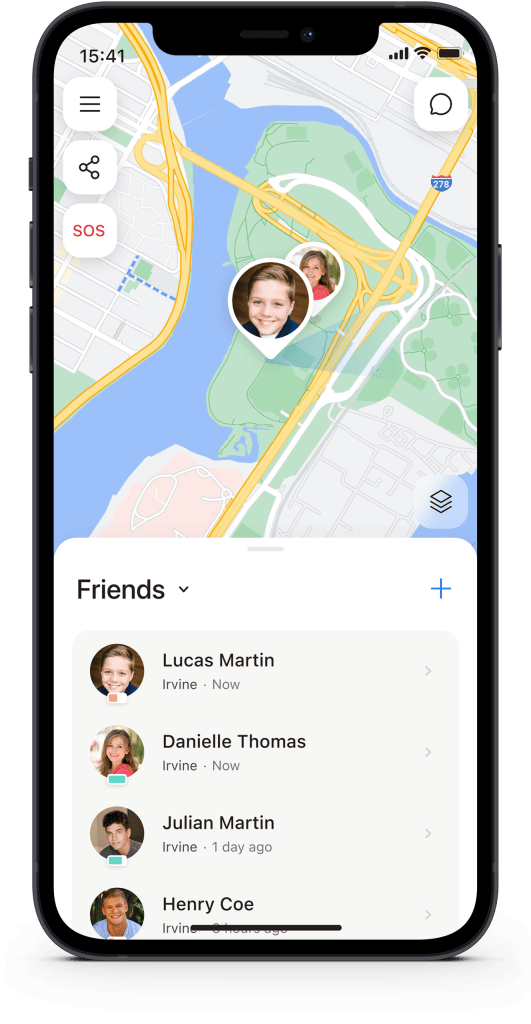
Both “Find My Kids” and “iSharing” are user-friendly and easy to navigate. “Find My Kids” has a straightforward interface with clear and concise information, while “iSharing” has a more comprehensive and feature-rich interface.
However, “Find My Kids” has some considerations to keep in mind: the app requires you to invite and connect with your children before you can explore its features or navigate through the menus, which may limit your ability to evaluate the app beforehand.

Find My Kids vs. iSharing: Accuracy
The accuracy of both apps is reliable and consistent, with minimal fluctuations in location data. However, both apps may be affected by external factors such as weak GPS signals or interference from other devices.
Find My Kids vs. iSharing: Battery Performance
“Find My Kids” may have a higher impact on device battery life due to its continuous monitoring features and background processes.
“iSharing” stands out with its unique patented battery-saving technology. The app consumes only around 1% of battery over 24 hours, meaning even if you leave the app running all day, it will barely affect your phone usage. This makes iSharing one of the most battery-efficient family tracking apps available.
Find My Kids vs. iSharing: Pricing
“Find My Kids” offers a free version with limited features that includes accurate location tracking, location and movement history for up to one day only, movement notifications for just one location, and three loud signals. The premium version costs $5 per month and provides access to the full feature set. Parents can also purchase GPS watches.
“iSharing” provides a generous free version that includes core location sharing features with significantly more functionality than Find My Kids’ free tier. Notable free features include 90 days of location history (compared to Find My Kids’ 1-day limit) and comprehensive driving reports including high-speed events, phone usage, hard braking, and rapid acceleration. These driving reports are particularly useful for monitoring school bus rides, bike trips, or new teen drivers. iSharing also offers a premium version for $10.99 per month. With their circle system, only one user needs to pay the premium service fees for the whole family to enjoy the benefits, making the effective monthly price approximately $3 per person for larger families.
Find My Kids vs. iSharing: Conclusion
Both “Find My Kids” and “iSharing” are excellent options for parents looking to keep track of their child’s location and activities. “Find My Kids” is a straightforward and easy-to-use app that provides essential features. “iSharing” is a more comprehensive app for kids with additional features like exceptional battery efficiency (only 1% usage per day), generous free version with 90-day history, driving reports, and emergency-triggered recording that balances safety with privacy.
Choose Find My Kids if:
- You prefer continuous surrounding sound monitoring
- The lower premium pricing works for your budget
Choose iSharing if:
- You want a more comprehensive solution with advanced features
- Battery efficiency and generous free features are important
- You prefer emergency-focused safety over constant monitoring
- You value family-friendly premium pricing
Ultimately, iSharing offers more comprehensive functionality for families seeking a balance of safety, trust, and advanced features, while Find My Kids provides a simpler approach for parents who prefer maximum monitoring capabilities.
